앞에서는 오버로딩에 대해 정리해본 바가 있다.
JAVA에서는 오버로딩을 공부할 때 같이 따라다니는 비슷한 이름을 가진 "오버라이딩"도 따로 존재한다.
JAVA 메서드 오버로딩
메서드 오버로딩이란? 하나의 클래스 안에 메서드 시그니쳐가 다르다면 같은 함수명을 사용해도 이를 허용한다는 뜻이다. ( => 함수명 중복정의 허용★)보통 비슷하거나 같은 기능일때에 사용
yn98.tistory.com
이전 오버로딩 글에 이어서 이번엔 오버라이딩에 대해 정리해보려고 한다.
오버라이딩이란?
부모 클래스로부터 상속받은 메서드의 내용을 재정의(변경) 하는 것을 오버라이딩이라고 한다. 물론 상속받은 메서드를 그대로 사용해도 되지만 자식클래스에서 변경해야 하는 경우가 많다. 이렇게 변경이 이루어지는 경우에 부모메서드를 오버라이딩해야 한다.
오버라이딩 사용 조건
- 상속
- 메서드명이 동일(=메서드 시그니쳐 동일)
- 기능이 같은 경우
- 코드가 다른 경우
아래는 오버라이딩 예제이다.
예제의 기본 틀은 아래와 같다.
<기본 틀>
모양 Shape
String name 이름
double area 넓이
String color 색
void draw(){
ㅁㅁ색 ㅁㅁ모양은 ㅁㅁ.ㅁㅁ 만큼의 넓이
}
원 Circle
int radius 반지름
double PI 3.14 원주율
사각형 Rectangle
int x, y 가로, 세로
요구사항
1. 이름이 없는 모양 객체는 없음
2. 어떤 모양의 색을 별도로 지정하지 않으면 기본 색은 검정
3. 원의 경우, 반지름을 별도로 지정하지 않으면 기본 1
4. new 사각형(10) == 정사각형 ( 가로와 세로 모두 10)
5. new 사각형(10, 20) == 직사각형
class Shape{
	String name; // 멤버변수
	double area; // 멤버변수
	String color; // 멤버변수
	Shape(String name){
		this(name,"검정");
	}
	Shape(String name, String color){
		this.name = name;
		this.color = color;
		this.area = 0.0;
	}
	void draw() {
		System.out.println(this.color+"색 "+this.name+"모양 넓이 : "+this.area);
	}
	void setArea() {
		System.out.println("Shape에서 호출한 setArea()");
	}
}

class Circle extends Shape {
	int radius; // 멤버변수
	static final double PI = 3.14; // final == 상수화, static == 클래스 변수 => 바로 초기화
	Circle(){
		this(1,"검정");
	}
	Circle(String color){
		this(1,color);
	}
	Circle(int radius){
		this(radius,"검정");
	}
	Circle(int radius, String color){
		super("원", color);
		this.radius = radius;
		this.setArea();
	}
	@Override
	void setArea() { // 넓이를 설정하는 메서드
		System.out.println("Circle에서 호출한 setArea()");
		this.area = this.radius * this.radius *Circle.PI; // (멤 = 멤 * 멤 * 클래스 변수)
	}
}
class Rectangle extends Shape {
	int x,y;
	Rectangle(int x){
		this(x,"검정");
	}
	Rectangle(int x, String color){
		super("정사각형", color);
		this.x = x;
		this.y = x;
		this.setArea();
	}
	Rectangle(int x, int y){
		this(x,y,"검정");
	}
	Rectangle(int x, int y, String color){
		super("직사각형", color);
		this.x = x;
		this.y = y;
		this.setArea();

	}

	// 오버로딩 : 함수명 중복정의 허용
	// 오버라이딩 : 메서드 재정의
	@Override // @ 어노테이션, 애너테이션
	void setArea() {
		System.out.println("Rectangle에서 호출한 setArea()");
		this.area = this.x * this.y;
	}


}


public class Test01 {
	public static void main(String[] args) {
		Circle c1 = new Circle();
		c1.draw();
		Circle c2 = new Circle("분홍");
		c2.draw();
		Circle c3 = new Circle(5);
		c3.draw();
		Circle c4 = new Circle(5, "주황");
		c4.draw();


		Rectangle r1 = new Rectangle(10);
		r1.draw();
		Rectangle r2 = new Rectangle(10,"파랑");
		r2.draw();
		Rectangle r3 = new Rectangle(10, 20);
		r3.draw();
		Rectangle r4 = new Rectangle(5, 30, "하늘");
		r4.draw();

		Shape s = new Shape("모양");
		s.setArea();
		Circle c = new Circle(1);
		c.setArea();
		Rectangle r = new Rectangle(10);
		r.setArea();

		// 객체지향의 핵심
		// 같은 메서드를 수행시켜도
		// 다른 주체자가 수행했다면
		// 다른 결과가 나온다.


	}

}
위 코드의 출력 결과는 아래와 같다.
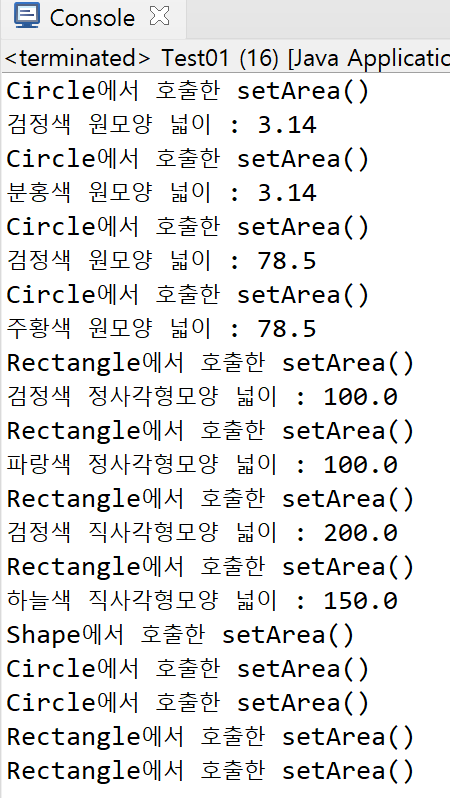
+ 개인적으로 코드가 돌아가는 순서를 이해하기 위해 xx에서 호출한 setArea() 코드도 출력되도록 하였다.
'JAVA' 카테고리의 다른 글
| JAVA 동적바인딩, toString() 예제 - 동물의 숲 (0) | 2024.07.04 |
|---|---|
| JAVA toString() 메서드에 대해서 (0) | 2024.07.04 |
| JAVA 상속, super() + 예제 (0) | 2024.07.03 |
| 학생부 프로그램 만들기 (이어서) (1) | 2024.07.03 |
| JAVA 오버로딩 실습 (0) | 2024.07.02 |